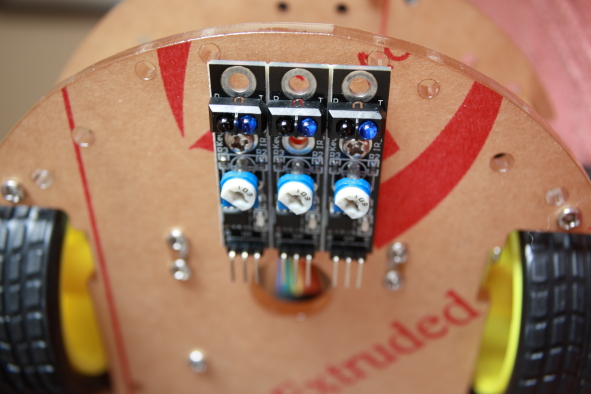
IR Line Track Module
<first published on Dec 26, 2012>
The Robot kit I’m building comes with three IR line tracking sensor modules. As with the other components, documentation is only available on the web. I have not found a source of information about how to use the sensors but it doesn’t seem to be that complicated.
— UPDATE —
The sensor has IR light emitter and detector. The sensor returns the status of the IR light reflected from a surface as ON or OFF. The status of the sensor is shown by the LED. The sensor needs to be calibrated to set the threshold between light and dark.
I managed to make the robot follow a curved line using only two sensors suing the sketch below. A complete line following solution will require all three sensors.
/*
  Follows a line on the floor using 2 IR line sensors
  This sketch will guide the robot to follow a wide circle
  making left turns only
 */

#include <Motor.h>
Motor motor;
int time;
int dir = 0;

// the setup routine runs once when you press reset:
void setup() {
  // initialize serial communication at 9600 bits per second:
  Serial.begin(9600);
  pinMode(10, INPUT);
  pinMode(11, INPUT);
  time = millis();
}

// the loop routine runs over and over again forever:
void loop() {
  // read the input on analog pin 0:
  int L = digitalRead(10);
  int R = digitalRead(11);
  // print out the value you read:
  Serial.print(L);
  Serial.print(",");
  Serial.println(R);

  int d = L - R;
  if(L==1 && R==1) {
    motor.turnRight(100);
  }
  if(L==1 && R==0) {
    motor.onFwd(motor.Motor_LR, 100);
  }
  if(L==0 && R==0) {
    motor.fwdLeft(100);
    delay(5);
  }
  if(L==0 && R==1) {
    motor.turnLeft(100);
    delay(5);
  }

  // stops the robot after 2 minutes
  if ((millis()-time) > 20000) {
    motor.off(motor.Motor_LR);
    return;
  }
}